
By Annya Kong, Staff Writer
This was the second time in two years that Payton’s Selenium site had to be redone.
Last year, Payton’s old Selenium was replaced by a pre-established event planning platform called Sched. The primary function of both websites was the same: teachers would be able to set up enrichments, so that students could sign up for them. Technically, both softwares succeeded – except, on Sched, the inefficient user interface led faculty and students to criticize the site as confusing, frustrating or “abominable”.
For the 2024-2025 school year, the enrichment portal was built from scratch by a four-person student team: seniors Stephen Liang, Jonathan Cheng, JunHui Guo and Sasha Dragoshanskiy. Modeled after its predecessors, incorporating requests from teachers and administrators and including their own ideas for new features, the design, development and integration of the site took over 800 hours of work. This year’s Selenium was released to the student body on August 29-30 and has so far proven to be the cleanest and most expansive Selenium our school has seen yet.
“I think it’s awesome,” said Kevin James, a physics teacher at Payton. “The UI is nicer, compared to what we had before.”
The programmers were interviewed by Paw Print.
Paw Print: Give me a brief rundown of the process – how it started, what inspired the design, who worked on what.
Selenium Programming Team [Stephen Liang]: Technically, this project began exactly one year ago. I had long hated Sched because of the difficulty using it over the Selenium I was so accustomed to. In September of 2023, I had made an attempt to bring back a version of the old Selenium, but I ultimately gave up as it was a daunting task to complete on my own.
Around January, an offer was sent out by Mr. Olson, who requested a technical team to help with registration automation as well as a serious thought into potentially bringing Selenium back. Thus, the spark was born (see timeline below).
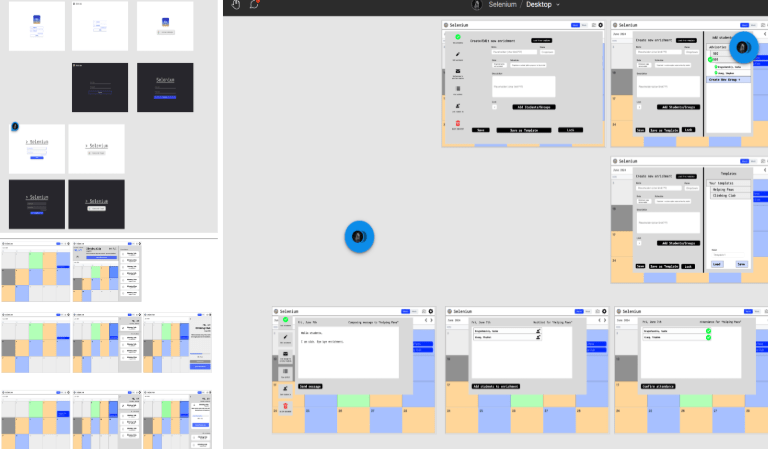
Sasha was our UI/UX designer – in short, the design you see on the site is his work.
JunHui worked on the backend – the server and the database. The reason you’re able to join and view enrichments is because of him.
[Stephen] worked on making the designs functional, providing logic for each button and menu so that it links cleanly with the backend. He also was the one who worked on deploying our website and hosting it on school servers.
Jonathan was our integration engineer, specializing in both front and backend. He worked hard creating new features and ensuring everything was properly implemented.
Paw Print: What is your favorite part of the Selenium you built? What are you most proud of?
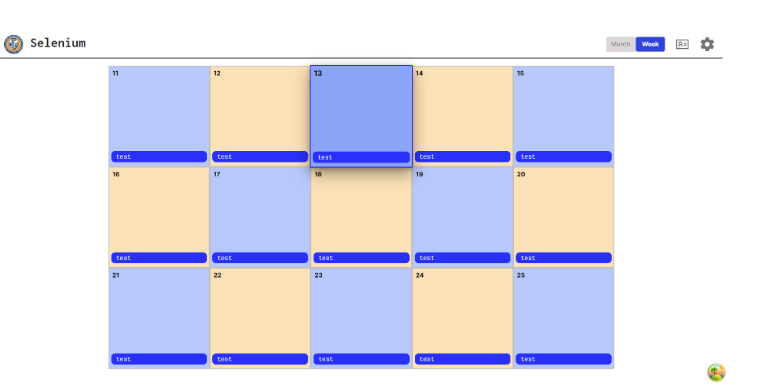
Selenium Programming Team: Our favorite part of Selenium is definitely the month view. We find it super intuitive to use and having the color-coded dates as a part of the Selenium calendar itself. Although Selenium is a work in progress, we’re particularly proud of the suite of teacher and administrator tools that make it super intuitive to use!
Paw Print: What was your favorite part of the process?
Selenium Programming Team: Our favorite part of the process was the process itself. We went through hundreds of iterations and changes. Here’s our timeline and process!
At around 50 hours, we finished up a comprehensive plan on all the features, functions, and designs of Selenium. These were some of our first prototypes (credit to Sasha). A lot of effort was put in by him to try and make a cohesive UI, figuring out how to divide requirements and functions into pages.

Around 100-150 hours in, this was our very first prototype of the calendar grid. It may not even seem recognizable, but this is where a lot of the work started.

About 250-275 hours in, we put in a lot of work regarding enrichment creation logic and handling students, but most importantly improving the calendar grid to feature school dates, month and grid headers, as well as the ability to shift the calendar in time.

450 hours: We completely revamped Selenium to a more modern/pastel look. Although not nearly as refined, we’re starting to get closer to the look that students know and love today. We also refined the week view, which many students may recognize as the view on mobile devices. At this point, the basic functions of Selenium such as enrichment creation, joining and pulling/locking work.

At around 550 hours, we put in more features that are present on the site today. At this point, the site closely resembles our current Selenium.
Hours 550-700 were largely marked by performance improvements, bug fixing and cybersecurity measures to ensure data security.
Our final 200 hours were spent on deployment to our servers here at Payton, onboarding students and teachers and doing extensive performance monitoring. During this time, we added many features and fixed an enormous amount of bugs thanks to our wonderful school community becoming our site testers. [This] adds up to ~900 hours of collective work.
Paw Print: What was the most meaningful part of building the site – what made you want to commit so much time and effort to it?
Selenium Programming Team: We enjoyed building a project that would have an impact on our school community. Seeing teachers cheer and support us throughout this whole process only motivated us to continue harder — it would not have been possible without their support. We also wanted to leave behind some sort of legacy, something that would leave an impact greater than our four years at Payton, on both the school and on our friendship. We’ve always wanted to make a project together, but most CS projects are intangible and inconsequential. With Selenium, we wanted to have a real effect.
Paw Print: What are your future hopes/plans for the site?
Selenium Programming Team: We have a lot of plans coming for this site! Throughout the school year (and in no particular order) we plan on adding Enrichment Waitlists, improved accessibility, Seminar Portal, Tutorials/Documentation and if we still have time at the end of the year, a Selenium mobile app available on iOS and Android.
Paw Print: How do you feel now that the app’s been released to the student body?
Selenium Programming Team: Overall, we’re happy that students enjoy it. Seeing feedback from students (compliments and criticisms) makes us proud of what we’ve done and we are grateful for the opportunity to benefit the school community in such a way.
Paw Print: The last few Seleniums were switched out for various reasons. What are your thoughts about the possibility that, someday in the future, the Selenium you built may be replaced yet again?
Selenium Programming Team: During this school year, we plan on creating extensive documentation and tutorials on maintenance to keep this system running for the next five to ten years. We’re also looking into passing the Selenium project on to be maintained by Payton’s technology department or perhaps the next generation of students. Even though Selenium may get phased out some day, we will always remember our journey.
![[Photo Gallery] Homecoming Football Game Payton vs. Brooks](https://paytonpawprint.com/wp-content/uploads/2026/03/img_4761.jpeg?w=1024)
 The Paw Print
Leave a comment